


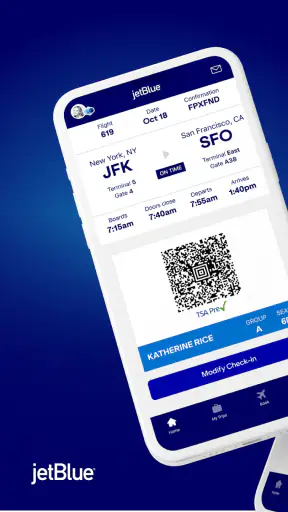

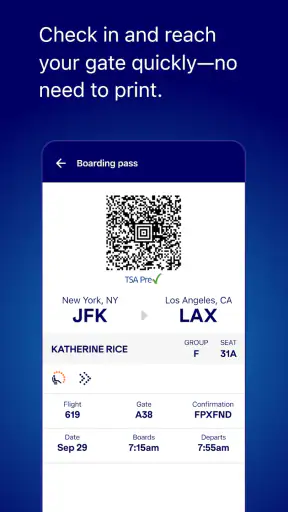
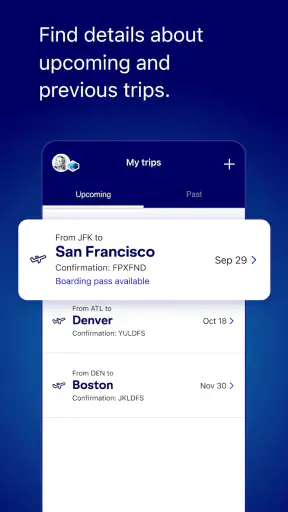
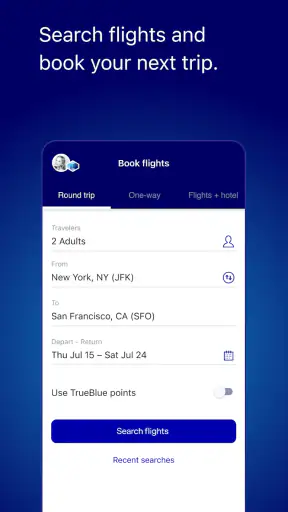

When I use an airline app, I am not looking for entertainment or a long list of extras. I want to check a trip quickly, keep control of my booking, and avoid unnecessary stress when plans change. JetBlue’s mobile app is built around that practical need. It comes from JetBlue Airways Corporation, is free to use, and sits in the Travel & Local category for everyone. After spending time with it, I see it as a useful companion for JetBlue passengers, especially people who prefer handling routine travel tasks themselves instead of waiting for a browser page or customer-service interaction.
The app has been available since October 18, 2012, and its current version is 9.12.0. It supports Android 8.0 and later, which makes it accessible on many devices that are no longer brand-new. Its store presence is also substantial: it has passed five million installs, with an average rating of 4.5 from roughly ninety-eight thousand ratings and about seventeen thousand written reviews. Those figures do not guarantee that every traveler will have a smooth experience, but they do suggest that the app is familiar to a large number of JetBlue customers.
Why trust matters in an airline app
Travel apps handle moments when people are already under pressure. I might open one in a crowded terminal, on a weak connection, or while trying to confirm details before leaving home. That changes how I judge it. A polished interface is helpful, but the more important question is whether the app lets me see what I am doing before I commit to a change, payment, or check-in step.
JetBlue is most convincing when treated as a direct tool for JetBlue travel rather than as a general flight-search service. If I am comparing many airlines, I would still use a broad travel search engine first. Those services are better for scanning alternatives across carriers. Once I have chosen JetBlue, however, the airline’s own app is the more natural place to manage that specific journey.
That distinction also affects trust. A third-party travel app may be useful for discovery, but the airline’s own application is the place I would expect to find the most relevant view of a JetBlue reservation. I still read every screen carefully, particularly when a change could affect the itinerary or cost. The app reduces friction, but it does not remove the need for attention.
One thing I appreciate is the straightforward purpose. The store summary, “More trips. Less hassle.”, is brief, but it matches the basic reason I would install the app: to keep travel administration in one place. I do not need it to replace every travel tool on my phone. I need it to make JetBlue-related tasks easier to reach when time matters.
What the app is genuinely good at
The strongest use case is the ordinary trip that starts days before departure and continues through the airport. I can imagine opening it at home to review the journey, checking it again while heading to the airport, and returning to it when I need the latest view of the booking. That repeated access is more convenient than searching through email every time I want to confirm which trip I am looking for.
It is also helpful for travelers who dislike airport uncertainty. Having the airline’s own app ready means I can begin with a familiar place instead of trying to remember which website or confirmation message contains the information I need. For a frequent JetBlue passenger, that familiarity can matter more than a collection of advanced features.
Families and occasional travelers may also find the app useful, although their needs are slightly different. A family organizer can use one device as the starting point for checking the household’s travel details, while an occasional flyer can avoid learning a new travel website for every journey. I would still verify each passenger and itinerary carefully before making changes, because convenience should not replace checking names, dates, and destinations.
The app is less suitable if I regularly fly several airlines and want one neutral dashboard for every reservation. In that situation, a general travel organizer may offer a broader overview. JetBlue’s app is focused by design, and that focus is an advantage for JetBlue trips but a limitation for mixed-airline travel.
Controls that deserve a careful look
My preferred way to use an airline app is deliberately cautious. I open it when I need to act, review the information shown, and close it when I am finished. That simple habit keeps the app in a clear role: a travel control panel rather than something I leave open constantly.
Account access is another area where I value visible choices. I want to know whether I am viewing a particular reservation, using a signed-in profile, or moving through a temporary booking flow. Those contexts can feel similar on a small phone screen, but they are not the same. Before changing anything, I would confirm that the displayed traveler and trip are the ones I intended to manage.
I also recommend taking a screenshot or saving essential travel information in a separate, secure place before heading to the airport. That is not a criticism unique to this app; it is sensible preparation for any travel service. An app can be convenient while the phone battery, network connection, or login process remains outside its control. Keeping a backup reduces the risk of depending on one screen at the worst possible moment.
When the app presents a choice involving a booking, I look for the final review stage rather than tapping through quickly. Airline changes can have consequences that are not obvious from a short button label. My rule is simple: if the action could alter the trip, I slow down, read the summary, and only then confirm. The app can make the path shorter, but I remain responsible for approving the result.
Data-sensitive moments during a trip
Airline apps naturally become more sensitive when I use them around a reservation. A trip can connect an account, passenger details, itinerary information, and travel timing in one place. That is why I would avoid opening the app on a shared device or leaving a signed-in session available for someone else to browse.
I am also careful with notifications. Travel alerts can be genuinely useful, but any message displayed on a locked screen may reveal that I have a particular trip. I would review the phone’s notification settings and decide how much information should appear before unlocking the device. The important point is not to assume that convenience and privacy always point in the same direction.
Location-related choices deserve the same attention. An airline app may feel more convenient when it can respond to where I am, but I prefer to grant access only when the benefit is clear to me. If I am simply checking a reservation from home, I do not see a reason to treat location access as automatically necessary. I would inspect the permission prompt and the phone’s settings instead of approving everything by habit.
Airport use creates another practical concern: public Wi-Fi. I would rather use a trusted connection for account-related actions, especially anything involving a booking or personal information. If I must use airport connectivity, I keep my session focused and avoid leaving sensitive screens visible after the task is complete. These habits are not glamorous, but they are more valuable than assuming an app alone can solve every privacy risk.
For the same reason, I would not install an unofficial imitation simply because it appears in a search result. The developer shown for this app is JetBlue Airways Corporation, and I would check that developer identity before installing. That small verification step is particularly important with travel tools, where a misleading app could exploit a traveler’s urgency.
How much control does the traveler keep?
The app works best when I treat it as an assistant, not an authority that makes decisions for me. I decide when to sign in, what trip to open, whether to accept a prompt, and whether an itinerary change is worth confirming. That sense of agency is important because airline travel often involves choices with financial or scheduling consequences.
I would also separate information gathering from action. First I review the trip and understand the situation. Then I decide whether I need to check in, adjust something, or contact support through another channel. This two-step approach prevents the common mistake of tapping the most prominent button simply because I opened the app while rushed.
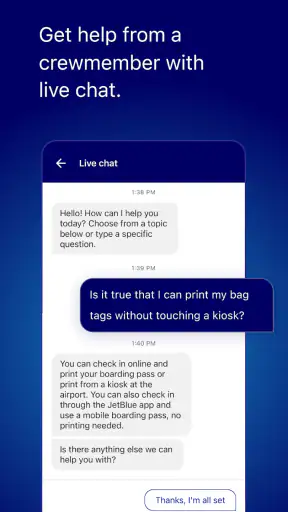
There are times when the app should not be my only plan. If a situation is complicated, urgent, or unclear, I would use the airline’s available support route rather than repeatedly trying options inside the app. A mobile interface is excellent for routine self-service, but it may not be the best place to resolve an unusual case that needs explanation or human judgment.
I would also avoid assuming that every traveler in a group should share one login. A single organizer may find one account convenient, but shared access can make it harder to tell who changed what and can expose more information than another person needs. Each traveler should use the access arrangement that fits the booking and their comfort level, with careful attention to the names and trip details shown before any action.
A realistic airport workflow
Imagine that I am leaving home for a JetBlue flight. Before departing, I open the app, identify the correct trip, and review the displayed details rather than relying on memory. I then make sure my phone has enough battery and that I can reach the important travel information without having to search through several unrelated apps.
At the airport, I use the app for the specific task in front of me instead of browsing aimlessly. If I need to check the journey again, I verify that I am still looking at the right passenger and destination. If a prompt asks me to confirm an action, I read the complete summary before proceeding. This workflow sounds basic, but it prevents avoidable mistakes when a terminal is noisy and crowded.
After completing the task, I lock the phone and avoid displaying travel details longer than necessary. If I am traveling with family, I communicate the relevant information directly rather than handing over an unlocked device with access to the entire account. The app makes self-service easier, but good travel hygiene still depends on how I use it.
For a return journey or a later trip, I repeat the same process instead of assuming that an old screen is still current. I want the app to help me confirm what applies now, not encourage me to rely on a screenshot or remembered detail from an earlier stage of travel.
Where it fits beside other travel tools
Compared with a mobile browser, the JetBlue app should feel more direct for a traveler who repeatedly manages JetBlue bookings. I do not have to start with a general web search, and the dedicated context can make the journey easier to find. The trade-off is that the app takes up space on my phone and ties its usefulness closely to one airline.
Compared with a broad flight-search app, it is not the tool I would choose for discovering the cheapest option across many carriers. A search service is better when my destination and dates are flexible or when I want to compare airlines side by side. Once the decision is specifically JetBlue, the dedicated app becomes more relevant.
Compared with email confirmations, the app offers a more active way to revisit a trip. Email is still valuable as a record and backup, but it can become difficult to navigate when several messages look similar. I would use both: the app for current interaction and email or another secure record for redundancy.
Compared with relying entirely on airport staff, the app gives me more independence for routine matters. That can save time, but it also means I must read carefully and recognize when a situation is beyond simple self-service. I would not judge the app harshly for failing to replace every human conversation; I would judge it by how clearly it supports the tasks it is meant to handle.
Who should install it, and who can skip it?
I recommend installing it if I have an upcoming JetBlue trip, fly with the airline regularly, or prefer keeping travel tasks on my phone. It is also a sensible choice for anyone who wants a direct connection to the airline’s own travel workflow rather than depending entirely on a third-party booking service.
I would skip it if I almost never fly JetBlue and do not want airline-specific apps taking up space. A browser and the original booking confirmation may be enough for a one-off journey. I would also hesitate if my phone runs an older system than Android 8.0, since the app requires that version or newer.
Travelers who want one application for every airline may be happier with a general travel organizer. That option can reduce app switching across different carriers, even if it may not provide the same airline-specific focus. The right choice depends on whether my priority is broad comparison or convenient management of JetBlue travel.
My cautious verdict
JetBlue is a practical, free Travel & Local app from JetBlue Airways Corporation that earns its place on my phone when I have a JetBlue journey to manage. Its large install base and strong 4.5 average rating show that many travelers find value in it, while the Everyone age rating keeps the intended audience broad. I like its focused purpose, its suitability for routine self-service, and the way it can reduce the need to dig through browser tabs or email.
My recommendation comes with a clear condition: use it deliberately. Check the developer before installing, review account and notification choices, be selective with permissions, and slow down before confirming anything that could affect a booking. I would keep a backup of essential travel information and use another support channel when a problem becomes complicated.
The app is most trustworthy as a focused tool when I remain in control of every meaningful choice. It is not a universal travel manager, and it should not be treated as a substitute for judgment or preparation. For a JetBlue passenger who wants a convenient mobile way to organize a trip, though, it is a sensible download and a useful companion from planning through the airport.
In my experience, that balance is the real reason to recommend JetBlue: it can make a specific airline journey easier without asking me to surrender responsibility for the decisions that matter.


